Optimizing the
Applied Learning Platform
Recommendations & Revised Workflows — v3
Strategic + tactical recommendations across five roles — Participant,
Instructional Strategist, Learning Administrator, Platform Manager, and
(new in v3) Content Creator — anchored to Inspired's Applied Learning Cycle.
"How do we reduce the time between learning and improved practice?"
— the framing question for every capability we build
Prepared for Preston Faykus
Inspired Instruction
Updated · May 11, 2026
What's new in this v3 update
This document replaces the prior v2 deliverable and incorporates the new direction in "User Stories & Strategy 3.18.26." The substantive changes are:
Applied Learning Cycle reduced to 6 stages. Prepare → Engage → Practice → Apply → Reflect → Adjust. "Practice" replaces "Activate" (better captures low-stakes try-it-in-session); "Adjust" replaces "Reinforce/Repeat" (single named phase for refinement + planning the next cycle).
Content Creator added as a fifth role. Per v3: "Designs for application and reinforcement, not consumption." The integrated cross-role view now shows how Content Creator feeds the Prepare and Adjust phases.
Framing question made explicit. "How do we reduce the time between learning and improved practice?" is the question every capability should answer.
Instructional Strategist intro video. ≤ 30 sec, profile-based, Platform-Manager-approved, auto-associates to assigned schools/workshops (User Stories A1, A2).
Learning Administrator School Context Profile + Cohort Snapshot. Readiness rating (1–5), change-pressure tags, top-3 priority focus areas, and an optional narrative note — one profile per school, reusable, plus per-workshop cohort context (User Stories A1–A5, B1–B2). This is the single biggest role expansion in v3.
Pulse-check refinements. Likert 1–5 + exactly 3 multiple-choice questions, framed as 'diagnostic, not test' — no scores shown, no pass/fail states, patterns-only views for IS (C1, C2, C3).
Locked-resources mechanism. Post-workshop resources are visible but locked pre-engagement (D1); IS releases them after delivery (D2). The mechanism doubles as a return-to-platform pull.
Strategist Insights surface. % logged in, % watched intro video, pulse aggregates, notable outliers — visible ≥ 3 days before engagement (E2, E3, E4).
Time-to-apply metrics replace generic 'completion rate.' % applied within 24h / 48h / 5 days, avg & median time from learning to first classroom use, avg applications to mastery.
Flowchart layout fixed. Each flowchart now spans multiple pages with clear 'Part X of N' labels so the entire flow is visible.
1. Executive summary
Inspired Instruction's differentiator is captured in one sentence in the v3 strategy: "We are creating an Applied Learning Platform for Inspired Instruction… a digital extension and augmentation of the in-person work we do." The platform is not an LMS, not a repository, and not an asynchronous course library. Its purpose is to "reduce the time between learning and improved practice."
The current flowcharts capture the steps each role takes, but they treat the platform as a linear sequence of tasks. To deliver on the strategy, the flows need five shifts:
Anchor every flow to the 6-stage Applied Learning Cycle — Prepare, Engage, Practice, Apply, Reflect, Adjust — so every screen, dashboard, and email shares one vocabulary.
Make Practice and Apply first-class phases. Today's flow ends at "complete post-engagement tasks," which means the platform never sees whether the learning was actually practiced or applied. The revised participant flow adds a 48-hour application gate with three branches (within 24h / 24–48h / delayed / attempted-but-failed).
Add an automated intervention layer that detects stuck users at each phase (missing pre-work, no action plan, no application 24h/48h/5d, missing reflection, drift) and triggers role-specific responses.
Add the missing Platform Manager flow and the new Content Creator role. Both are referenced in user stories but absent from the current flowcharts. Together they own publishing, certification, pattern detection, renewal signal, and the microlearning library that feeds the intervention layer.
Close the business loop by surfacing time-to-apply metrics, cohort-level outcomes, and next-engagement signals back to HubSpot and the Account Owner. Every cycle becomes a measurable renewal/expansion opportunity.
Section 4 contains the integrated cross-role master view. Sections 5a–5d contain the four revised role flows. Each role flow spans 3–4 pages so the entire flow is visible.
2. Strategic diagnosis — what the current flows miss
Gap 1 — The cycle vocabulary is implicit
v3 commits to the 6-stage cycle: Prepare → Engage → Practice → Apply → Reflect → Adjust. The current flowcharts don't name those stages, which means the design team has no shared vocabulary for where a user is in their journey. Naming the phases on every flow gives engineering, design, and content teams a common spine, and gives the Instructional Strategist a way to talk about "where did we lose this cohort?"
Gap 2 — Practice and Apply are missing
The current Participant flow ends at "Confirms Completion of all Learning Path Stages." But the v3 strategy says the value prop is "reducing the time between learning and improved practice." If the platform stops at survey completion, it's measuring task completion, not behavioral change. The revised Participant flow makes Practice (the low-stakes try-in-session) and Apply (the 48-hour real-world attempt) explicit phases, each with their own decision gates and triggered nudges.
Gap 3 — The roles operate in silos
The three current flowcharts run in parallel with no visible handoffs. v3 strengthens this dependency by introducing the LA School Context Profile (read by the IS), the IS pre-engagement Context Brief (built from LA inputs + pulse aggregates), and the IS intro video (auto-associated by Platform Manager). The integrated cross-role view (Section 4) makes these handoffs explicit phase-by-phase.
Gap 4 — There's no intervention layer
The v3 strategy is explicit about behavioral measurement: "% reporting use of a strategy within 24 hours, 48 hours, 5 days?" These thresholds are interventions waiting to be built. We recommend adding the intervention layer as a cross-cutting capability that wraps the cycle and fires on absence of expected behavior at each phase.
Gap 5 — The business loop is open-ended
Today the flows end at "engagement complete." v3 surfaces specific business-loop questions: "Which instructional strategies are effectively applied the fastest? How many nudges or reminders do people need? Which coaching intervention or support changes classroom behavior?" Capturing these signals and surfacing them to HubSpot + the Account Owner converts each engagement into a measurable next-engagement opportunity.
Gap 6 — Two roles defined in v3 are missing from the flowcharts
Platform Manager (P1–P4 in the prior user stories, A1/A2/C2 in v3) and Content Creator (introduced in v3's role-goal table) both need flows. The Platform Manager owns engagement creation, content publishing rules, intro-video approval, certification, and the renewal signal. The Content Creator designs microlearning specifically for application + reinforcement — feeding the intervention layer and the IS's recommendation engine.
3. The unifying frame — Inspired's Applied Learning Cycle
Every revised flow uses the same 6 phases. Naming them on every dashboard, in every email, and in every screen header gives the platform a coherent narrative anchored to Inspired's in-person methodology.
| Phase | What's happening | What every role must produce here |
|---|---|---|
| 1. Prepare | Build readiness + context | Participant pre-work submitted; IS has read it; LA context profile updated. |
| 2. Engage | Introduce + model learning | Attendance + active engagement signal; IS tailors to cohort. |
| 3. Practice | Low-stakes try in session | Written action plan (what / when / with whom); observable practice in role-play, modeling, or planning. |
| 4. Apply | First real-world attempt within 48 hrs | Evidence of application (artifact, observation, self-report); time-to-first-application logged. |
| 5. Reflect | What worked / didn't | Post-application reflection + survey + identified gap. |
| 6. Adjust | Refine + plan next cycle | Repeat applications toward mastery; supplemental resources released; next-engagement signal surfaced. |
The single most important design principle (carried forward from v2) Every phase, on every role's dashboard, must answer one question: "What's the next behavior I expect from this user — and what triggers fire if it doesn't happen?" If a screen can't answer that, it shouldn't ship. |
|---|
The five roles and their v3-stated goals:
| Role | v3 goal (verbatim) |
|---|---|
| Participant | Understands learning priorities and Applies learning faster |
| Learning Administrator | Reinforces learnings and Realizes school impact sooner |
| Instructional Strategist | Prepares more precisely and guides Participant Learning Path |
| Platform Manager | Enables coherence |
| Content Creator | Designs for application and reinforcement, not consumption |
4. Integrated cross-role view
The master flow on the next page is the spine we recommend the platform be designed against. Read it as a swimlane: each column is a phase of the Applied Learning Cycle, each row is a role, and each cell shows what that role does in that phase. The bottom row is the automated intervention layer — the same layer wraps the entire cycle.
Key things to notice:
Five roles, not three. Content Creator now sits underneath the Participant row in the master view — feeding microlearning into the IS Adjust column and the Platform Manager Prepare column.
Each phase has at least two roles in play. Even Practice (which used to be invisible) now has IS facilitating, Participant submitting an action plan, LA observing practice signals, and PM logging practice data.
Arrows are handoffs, not just task order. When the LA completes the School Context Profile in Prepare, that handoff is what unlocks the IS Context Brief — IS prep is no longer generic.
The Adjust phase loops back to Prepare. This is the business loop. Platform Manager surfacing renewal/expansion to HubSpot + Account Owner is what converts each cycle into a growth opportunity.
The intervention layer fires on absence of behavior, not presence. Missing pre-work, no action plan, no application within 24h/48h/5d, missing reflection, drift in Adjust — each one is a triggered nudge.
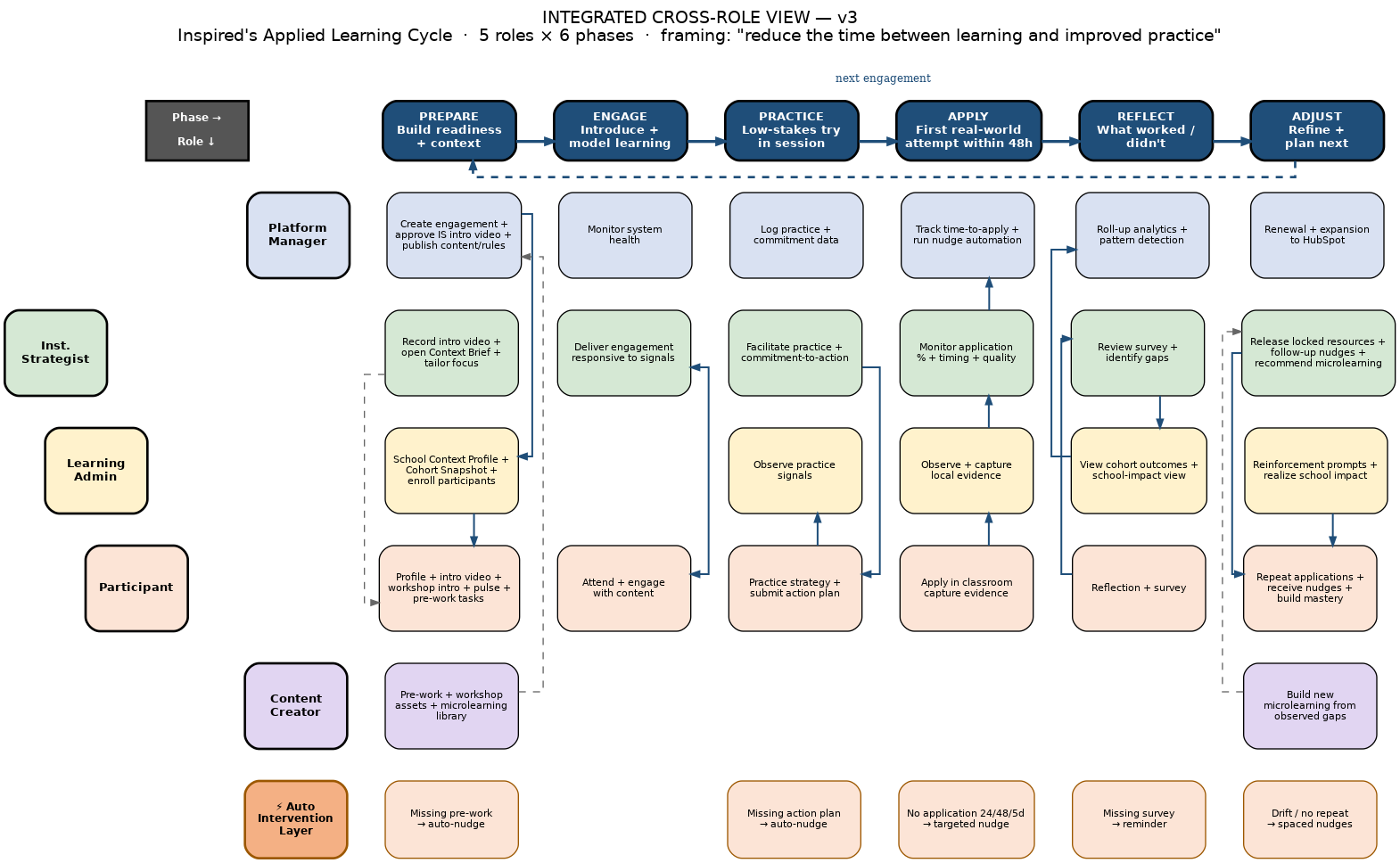
Figure 1. Integrated cross-role view — 5 roles × 6 phases + intervention layer.
5. Revised role flows
Each flow below shows one role's perspective through the Applied Learning Cycle. The flows are designed to be readable on their own, but they cross-reference each other — e.g., the IS's "mark complete" in Practice is what triggers the Participant's certificate eligibility and the LA's reinforcement window. Each flow spans 3–4 pages so it renders fully.
5a. Participant flow
Key changes from the current flow:
Practice + Apply are now first-class. Participants practice the strategy in-session (role-play / modeling / planning), commit to a specific action plan, and have an explicit 48-hour application gate with three branches (within 24h / 24–48h / delayed / attempted-but-failed). This is where the behavioral payoff lives.
IS intro video on every workshop page. Per v3 A2: a ≤30-sec strategist intro auto-associates to the assigned workshop so the participant meets the IS before arriving.
Workshop intro text with TTS. Per v3 B1: 3–6 focus-point bullets + reminders, with text-to-speech, displayed prominently before the workshop.
Pulse check refined — 'diagnostic, not test.' Per v3 C1/C2: a 5-point Likert scale + exactly 3 MCQs tied to focus points. No scores, no pass/fail. The UI carries 'this is a pulse check' language explicitly.
Locked resources are visible. Per v3 D1/D2: post-workshop resources appear in a locked/greyed state pre-workshop with a 'releases after the workshop' label — and the IS releases them by switching the state after delivery. This is also the participant's reason to return to the platform.
Certificate gated behind survey. Per the prior P4 user story — but now made explicit in the flow.
Habit loop + next-engagement surface. After repeat applications across 5 days / 4–6 weeks, the participant's profile updates with demonstrated competencies, and the system surfaces next-engagement suggestions tied to their application gaps.
Pre-work readiness gate at 24 hours. If pre-work isn't done 24 hours before the engagement, auto-nudge fires and the participant is flagged on both the IS and LA dashboards.
5a. Participant flow — Part 1 of 3
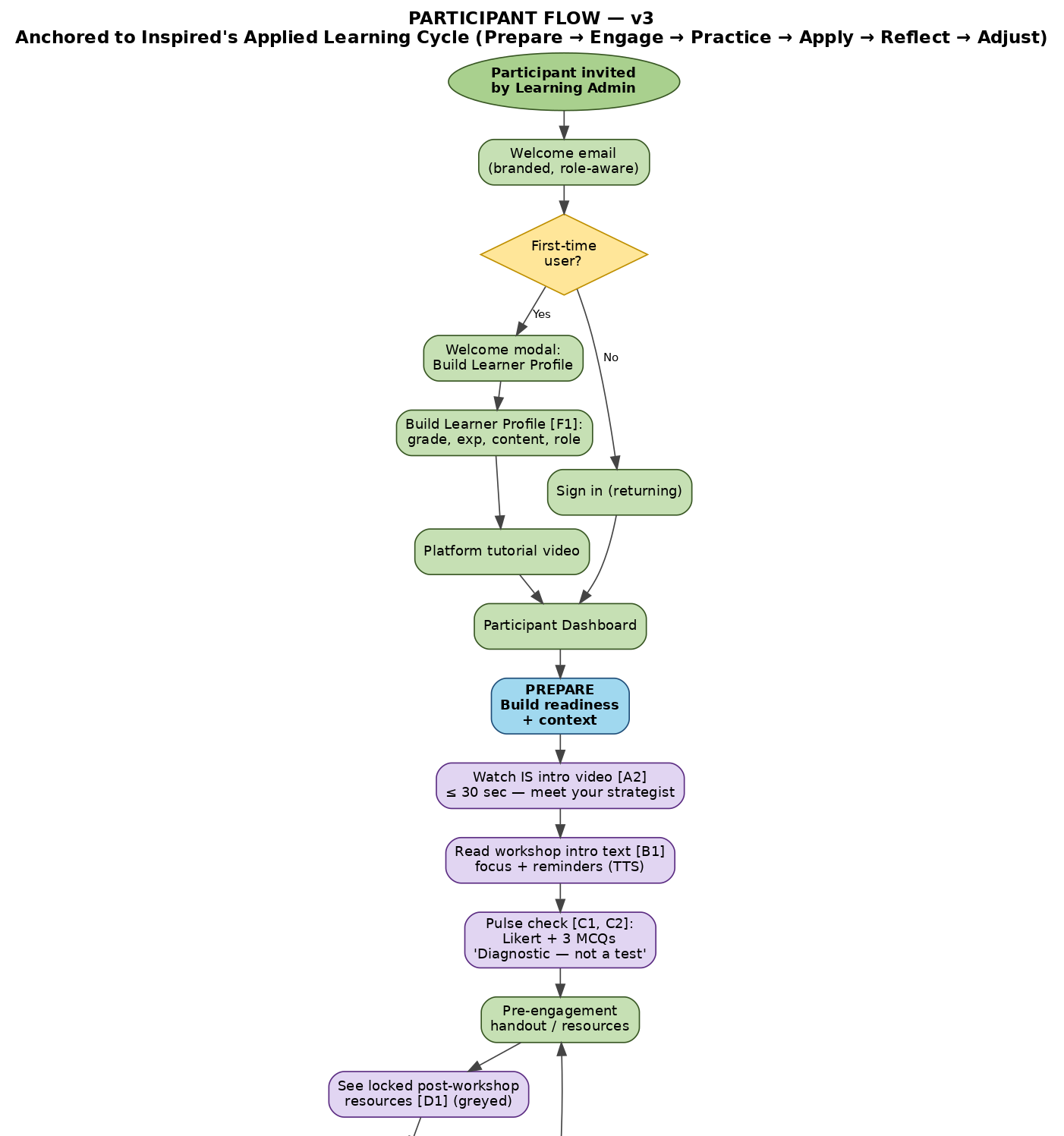
Part 1 of 3
5a. Participant flow — Part 2 of 3
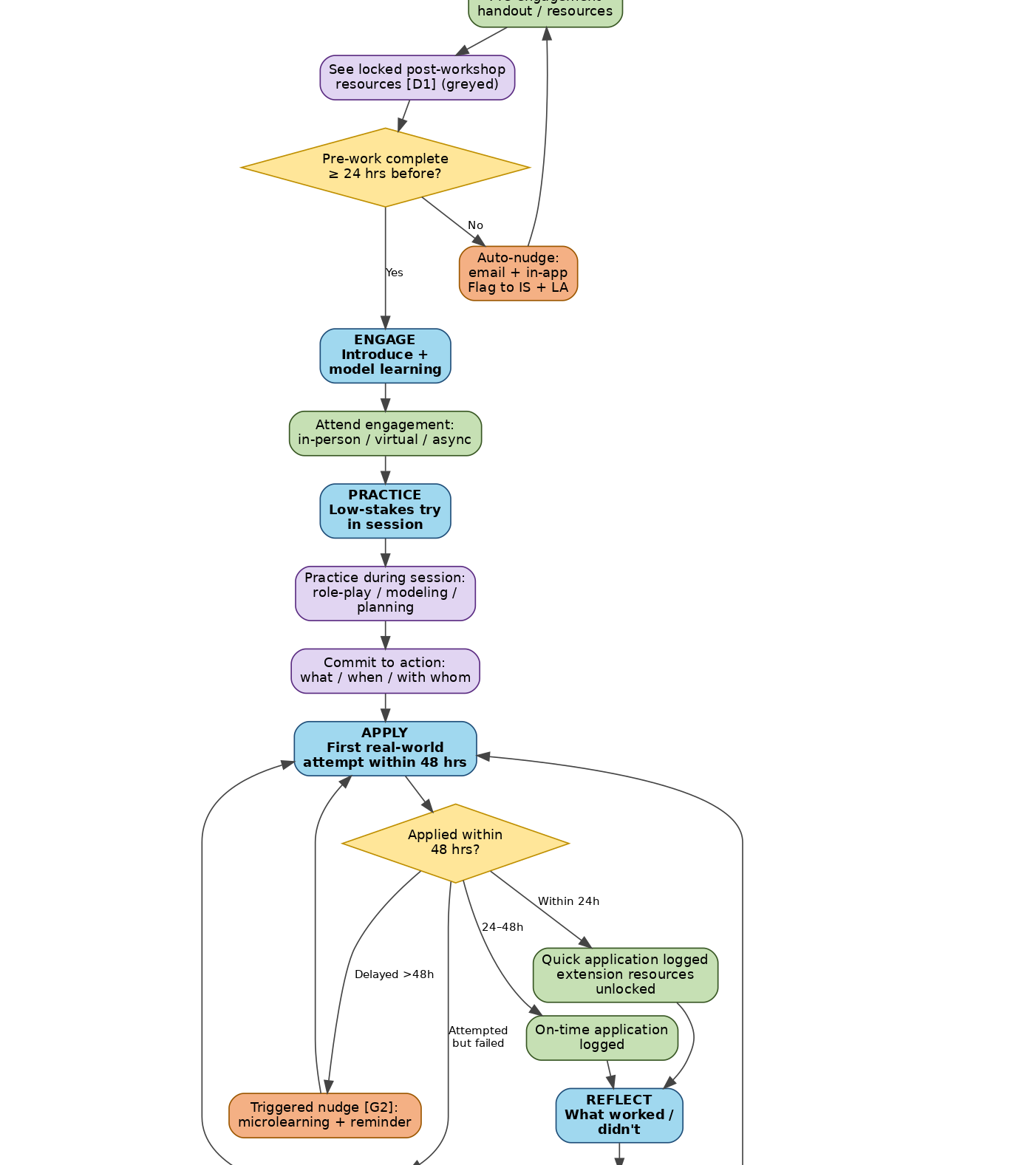
Part 2 of 3
5a. Participant flow — Part 3 of 3
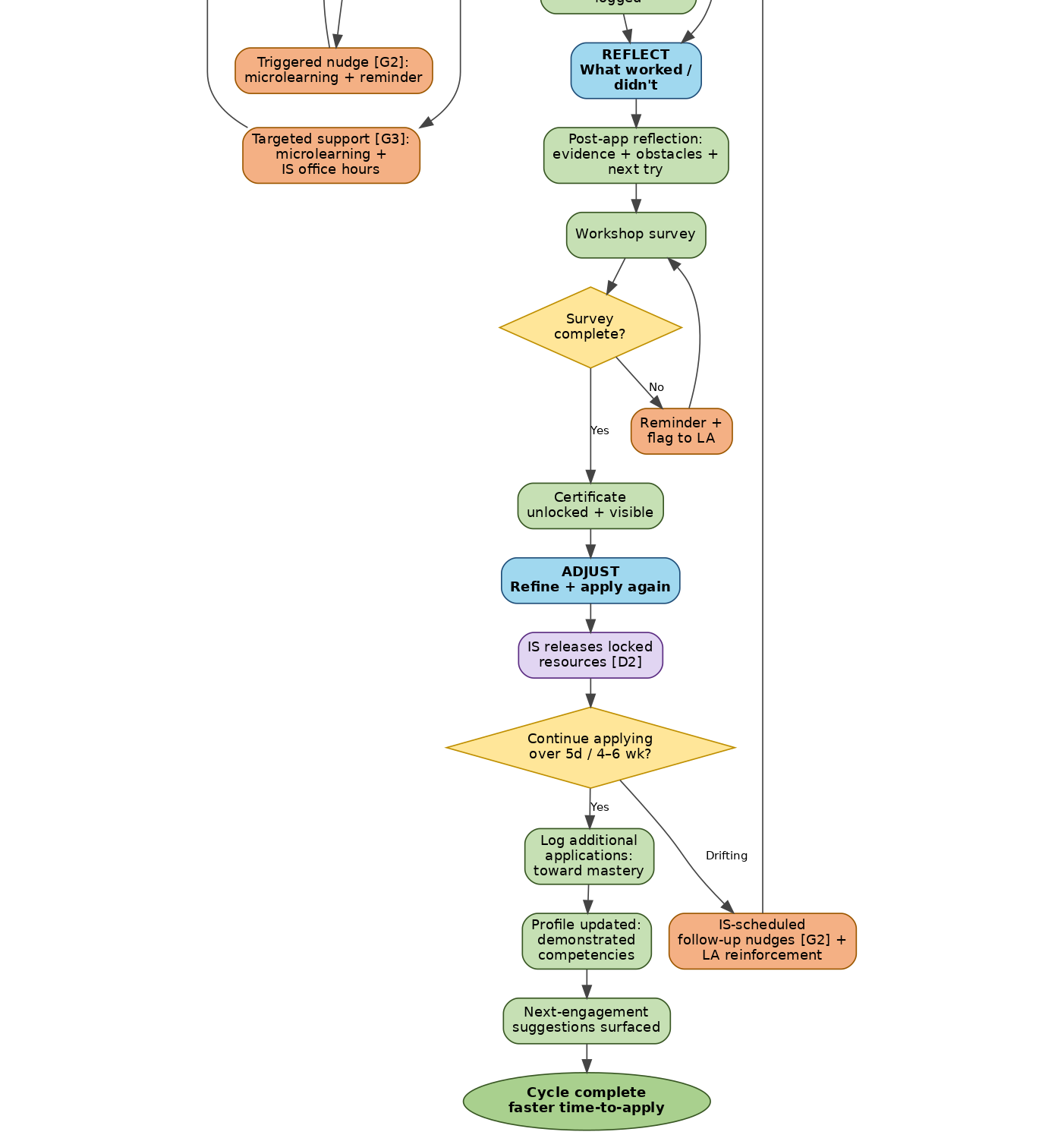
Part 3 of 3
5b. Instructional Strategist flow
Key changes from the current flow:
Intro video upload is the new onboarding step. Per v3 A1: the IS records or uploads a ≤30-sec (max 45-sec) video, saves it to their profile, and submits for Platform Manager approval. Once approved it auto-associates to every assignment.
Pre-engagement Context Brief replaces ad-hoc prep. Per v3 C1: the IS opens one Context Brief visible ≥ 3 days before the engagement. It surfaces the LA School Context Profile (readiness rating, change-pressure tags, top-3 priorities, narrative note), the Cohort Snapshot (attendee group, count), Strategist Insights (% logged in, % watched intro, pulse aggregates, notable outliers), and the cohort profile summary. This is the difference between a generic workshop and a responsive one.
Resource visibility timing is on the flow. Slide deck IS-only; participant materials gated; release actions logged. v3 D2 makes post-workshop release the IS's decision.
"Mark complete" is a system action with three downstream effects — it triggers the participant survey, certificate eligibility, and the application-tracking window. The flow shows this explicitly.
Stuck-participant detection drives targeted intervention. Per v3 G1/G2/G3: the IS can respond asynchronously to reflections, schedule 1–3 follow-up nudges, and recommend microlearning from the Content Creator library. The dashboard exposes time-to-first-application and the 24h / 48h / 5d thresholds directly.
Next-engagement signal feeds three places. The IS's cohort-gap signal goes to the LA dashboard (so the LA can champion the renewal), the Platform Manager queue (so renewal/expansion surfaces in HubSpot), and the Content Creator backlog (so new microlearning gets prioritized).
5b. Instructional Strategist flow — Part 1 of 4
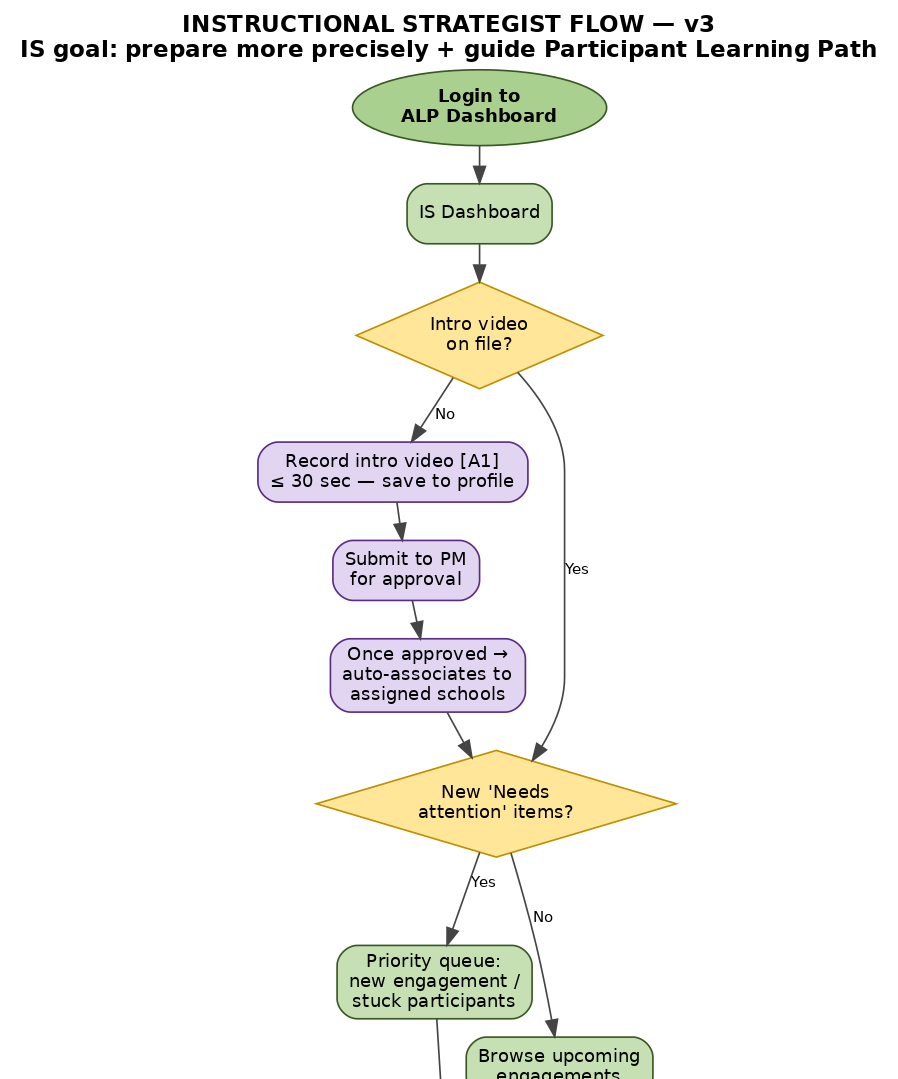
Part 1 of 4
5b. Instructional Strategist flow — Part 2 of 4
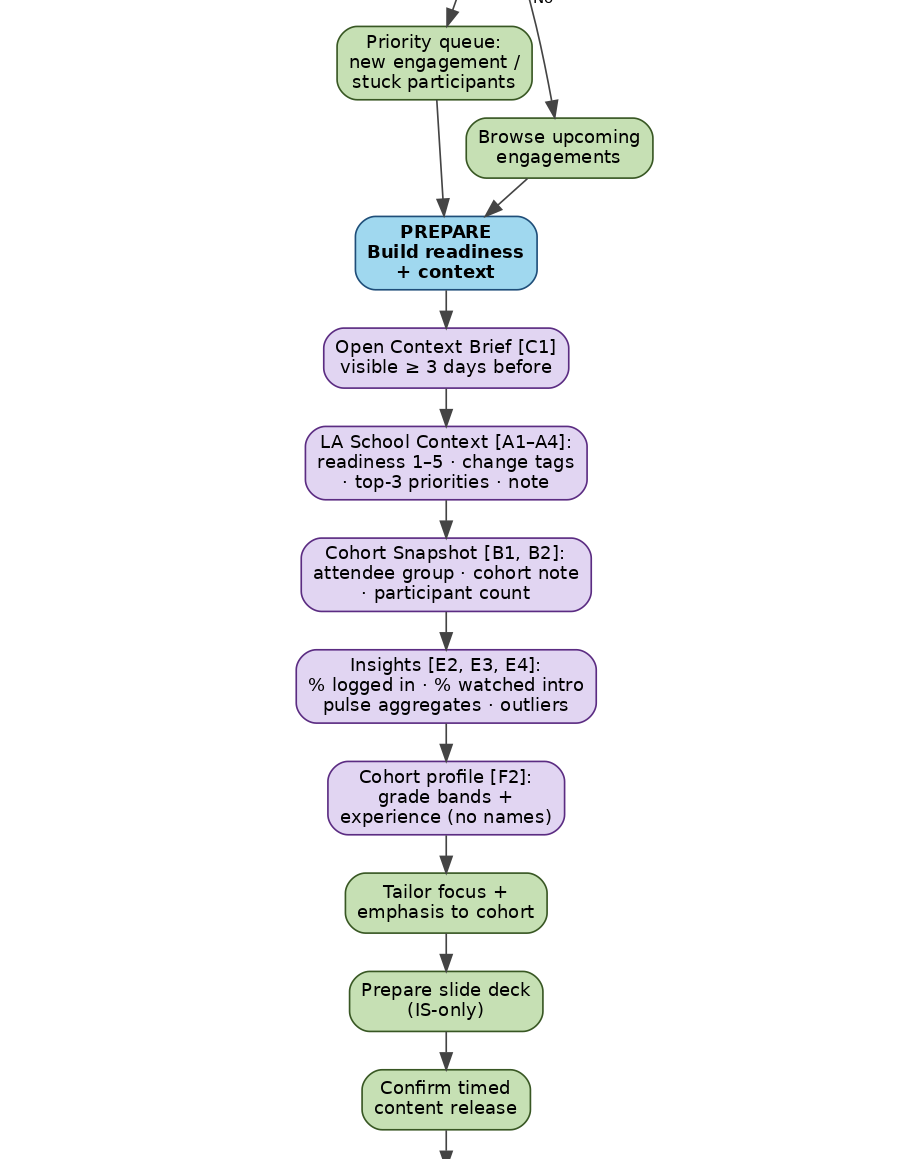
Part 2 of 4
5b. Instructional Strategist flow — Part 3 of 4
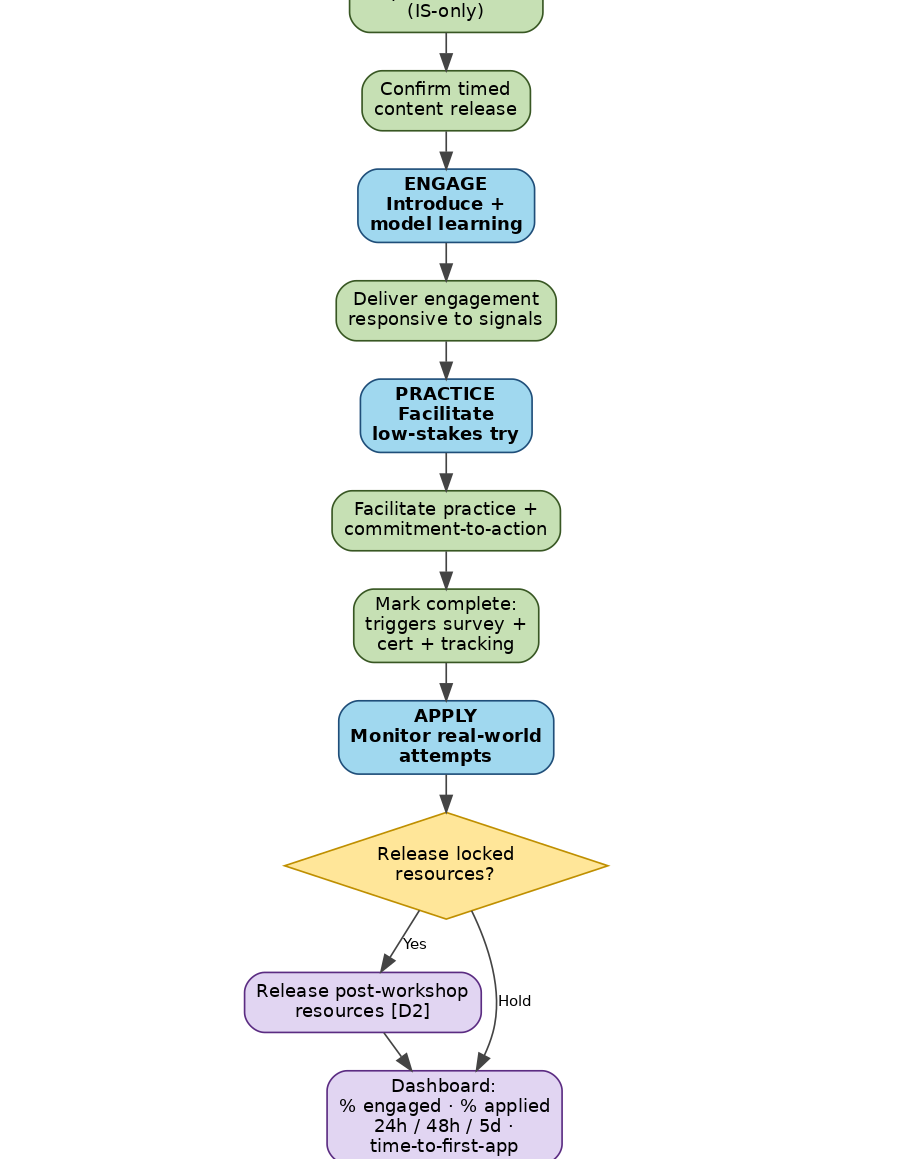
Part 3 of 4
5b. Instructional Strategist flow — Part 4 of 4
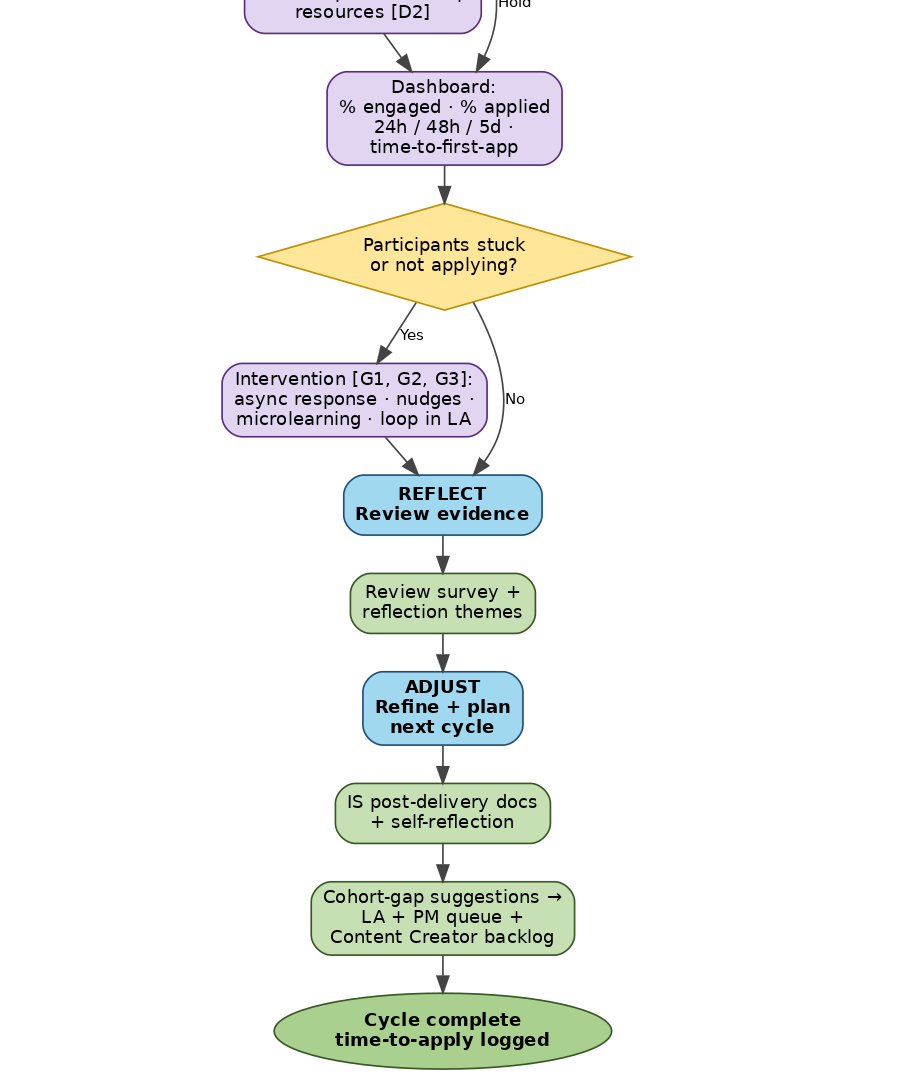
Part 4 of 4
5c. Learning Administrator flow
Key changes from the current flow:
School Context Profile is the new front door. Per v3 A1–A5: one profile per school, reusable, completed in under 5 minutes. Contents: readiness rating (1–5 from Resistant/fatigued to Highly engaged); change-pressure tags (new curriculum, leadership transition, staffing shortages, accountability pressure, new instructional initiative, other); up to 3 priority focus areas from a fixed list (literacy, math, discourse, differentiation, behavior, MTSS, teacher clarity, other); optional narrative note (≤500 chars). Last-updated timestamp is shown; updates apply to future engagements unless overridden at the workshop level.
Cohort Snapshot for each engagement. Per v3 B1/B2: attendee group dropdown (grade-level / department / leadership team / whole staff), cohort note (≤300 chars), and expected participant count. This is what gives the IS logistical confidence the day-of.
Pulse aggregates may be visible to LAs. Per v3 C3: aggregates only (patterns, not individuals); no names; no scores. This lets the LA know whether the cohort is showing up ready.
Reinforce → Adjust phase is now first-class. v3 reinforces the LA's role in reinforcement and "realizing school impact sooner." The flow makes Adjust a named phase with explicit actions: reinforcement prompts, encouraging survey completion, reinforcing application expectations.
Cohort outcomes and school-impact view. Completion rate, application rate + speed, repeat-application rate, and impact evidence are surfaced in one view. This is what the LA shows their leadership to justify the investment.
Strict guardrails on context entry. Per v3 D1/D2: the entire context profile must take under 5 minutes; the narrative note warns against names or confidential personnel details. The UI carries explicit "This helps tailor the experience. This is not evaluative." language.
5c. Learning Administrator flow — Part 1 of 4
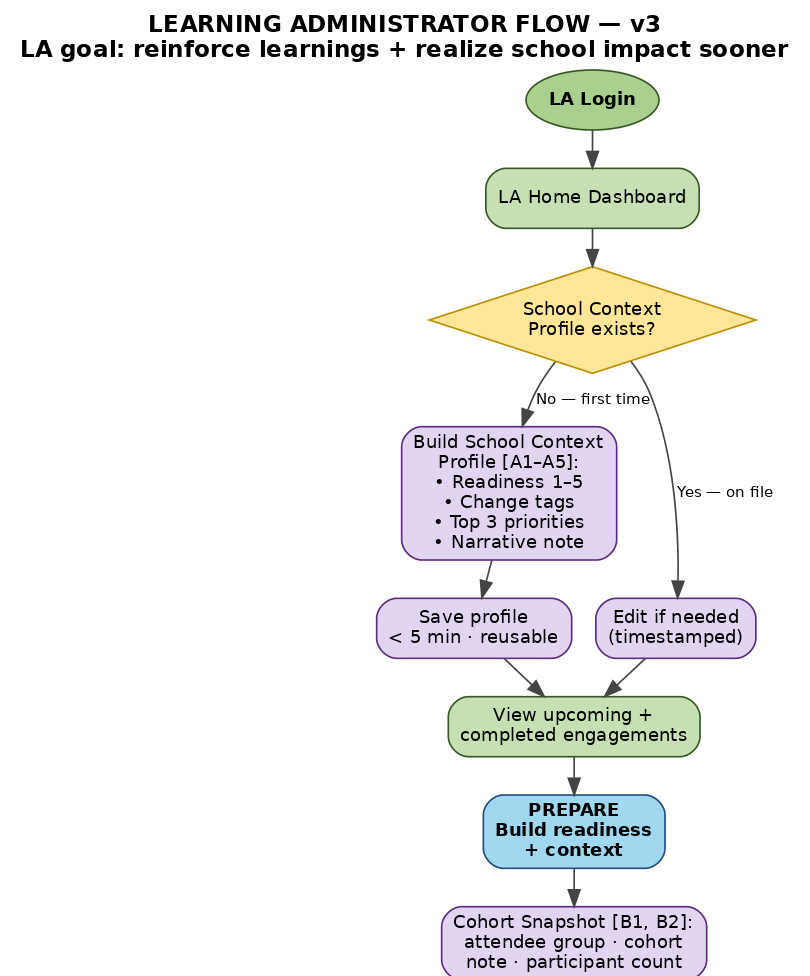
Part 1 of 4
5c. Learning Administrator flow — Part 2 of 4
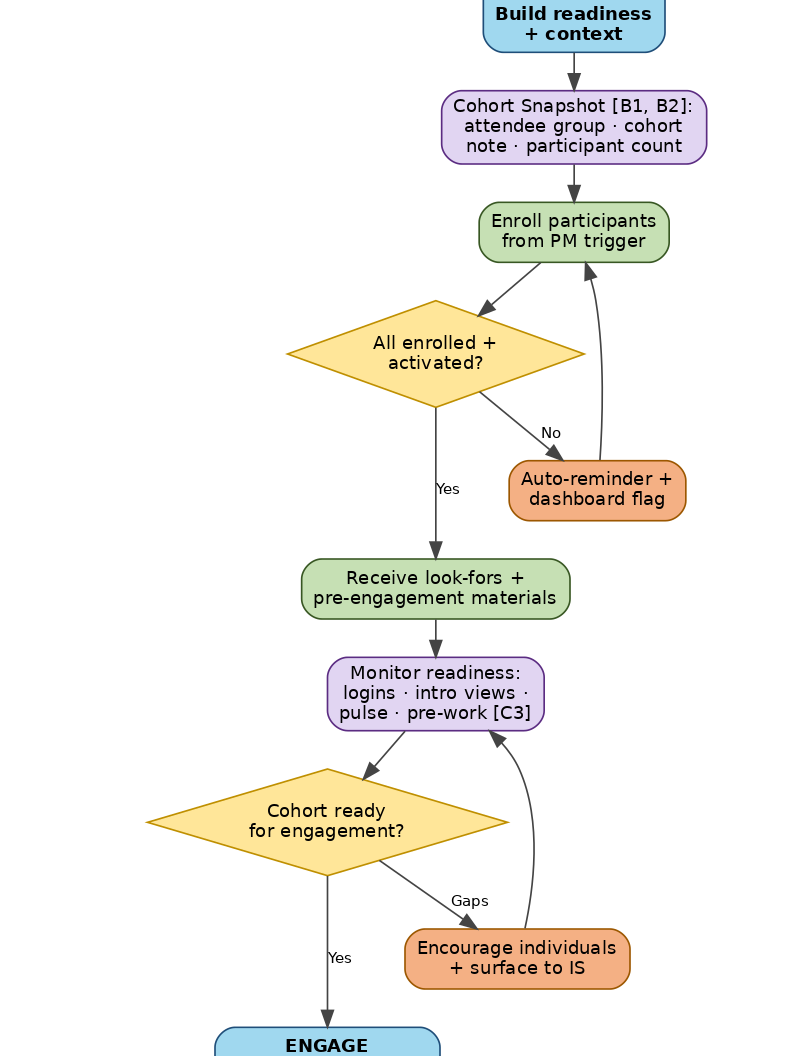
Part 2 of 4
5c. Learning Administrator flow — Part 3 of 4
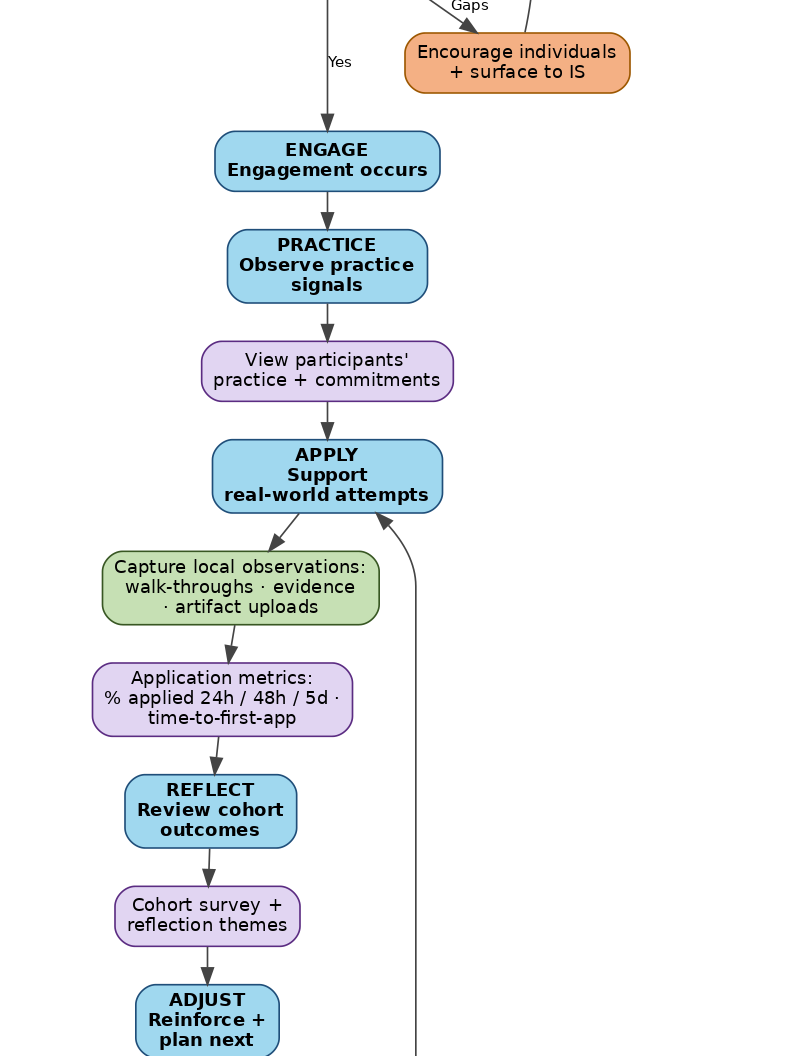
Part 3 of 4
5c. Learning Administrator flow — Part 4 of 4
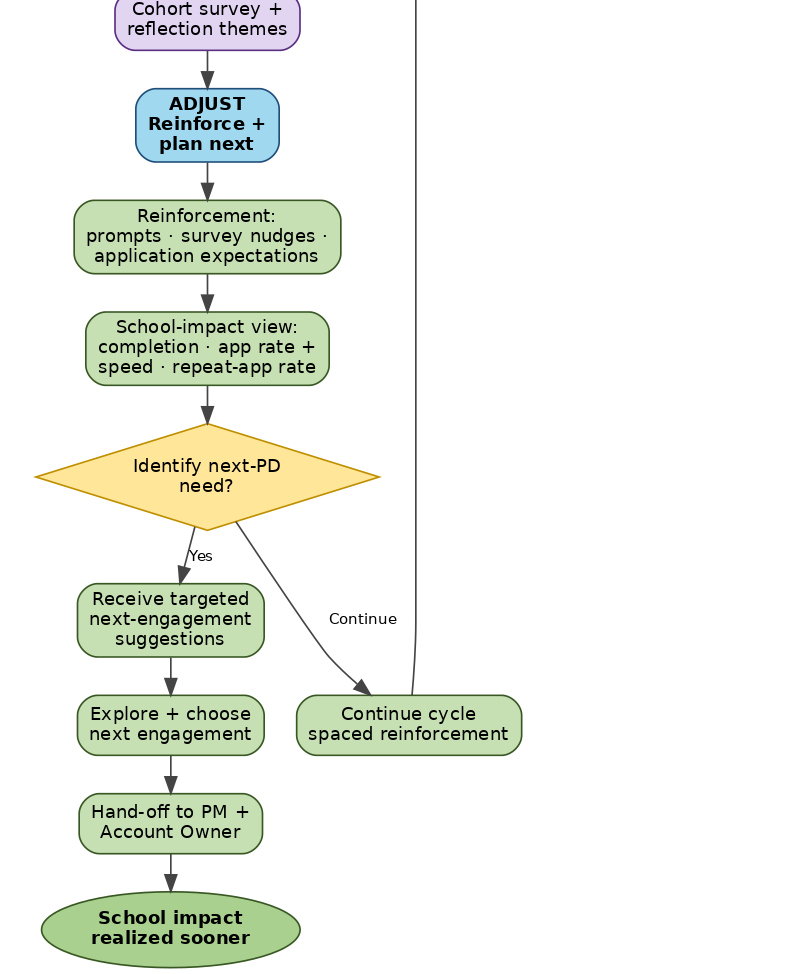
Part 4 of 4
5d. Platform Manager flow (new)
Key changes from the current flow:
Approve IS intro video submissions. Per v3 A1: video isn't active until Platform Manager approves. PM has a review queue (approve / reject / request changes). If no video exists, the platform shows a 'coming soon' fallback and logs an admin alert.
Auto-associate video to school/workshop assignment. Per v3 A2: when a strategist is assigned to a school or workshop, the participant-facing intro section shows that strategist's video. If the assignment changes, the displayed video updates.
Briefing Report inclusion. Per v3 C1 note: the PM is responsible for bringing in the Briefing Report from Client Directors. Recommendation in the v3 source: Client Directors may create briefings directly in the platform rather than HubSpot.
Pulse-check guardrails enforcement. Per v3 C3: PM enforces no individual scores, no pass/fail, and patterns-only views for IS. This is a platform-policy responsibility, not a per-engagement one.
Content publishing rules. Pre-work → LA + Participants; workshop materials → timing-gated; slide deck → IS only; post-workshop resources → locked until IS release. PM owns these defaults; per-engagement overrides are logged.
Time-to-apply analytics roll-up. Per v3 measurement focus: time-to-first-application, % applied within 24h/48h/5d, average applications-to-mastery, repeat-application rate. Filterable by readiness, change load, and priority — meaning the PM can answer questions like "do schools with high accountability pressure apply faster?"
Content Creator backlog feed. When cross-engagement patterns surface common gaps (e.g., "40% of teachers struggle with Q2 across cohorts"), PM feeds those signals to the Content Creator so the microlearning library evolves with the population.
Renewal/expansion signal back to HubSpot. High-performing cohorts get auto-captured as case studies. At-risk cohorts get flagged to IS + Account Owner.
5d. Platform Manager flow (new) — Part 1 of 4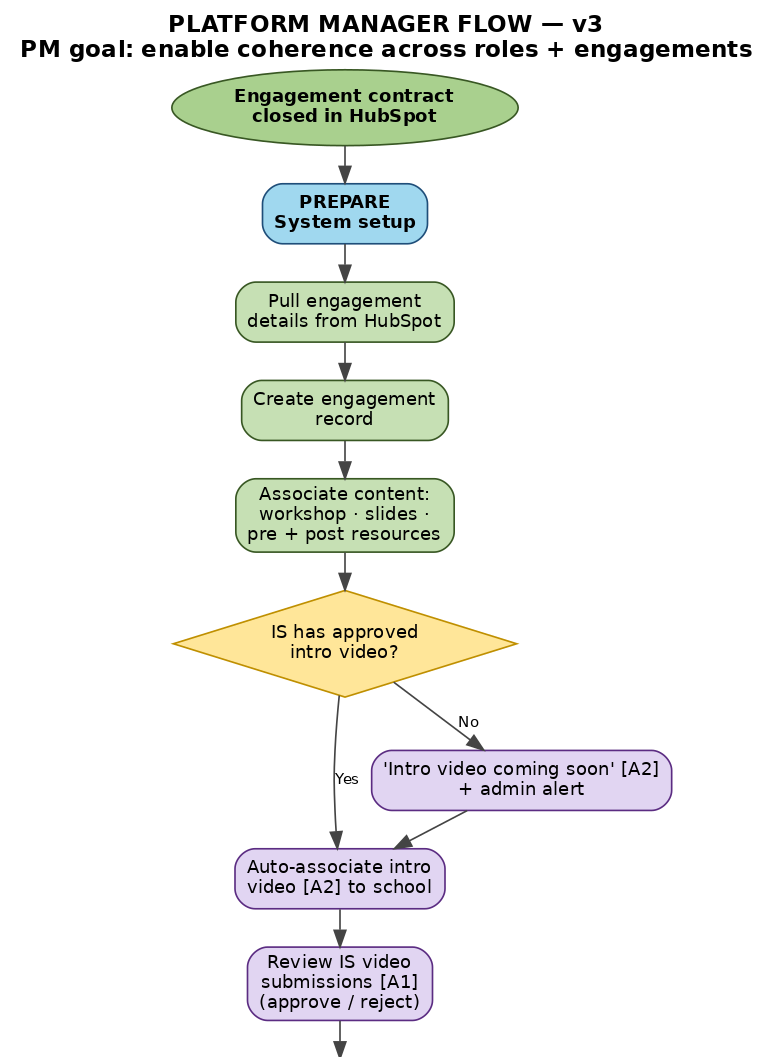
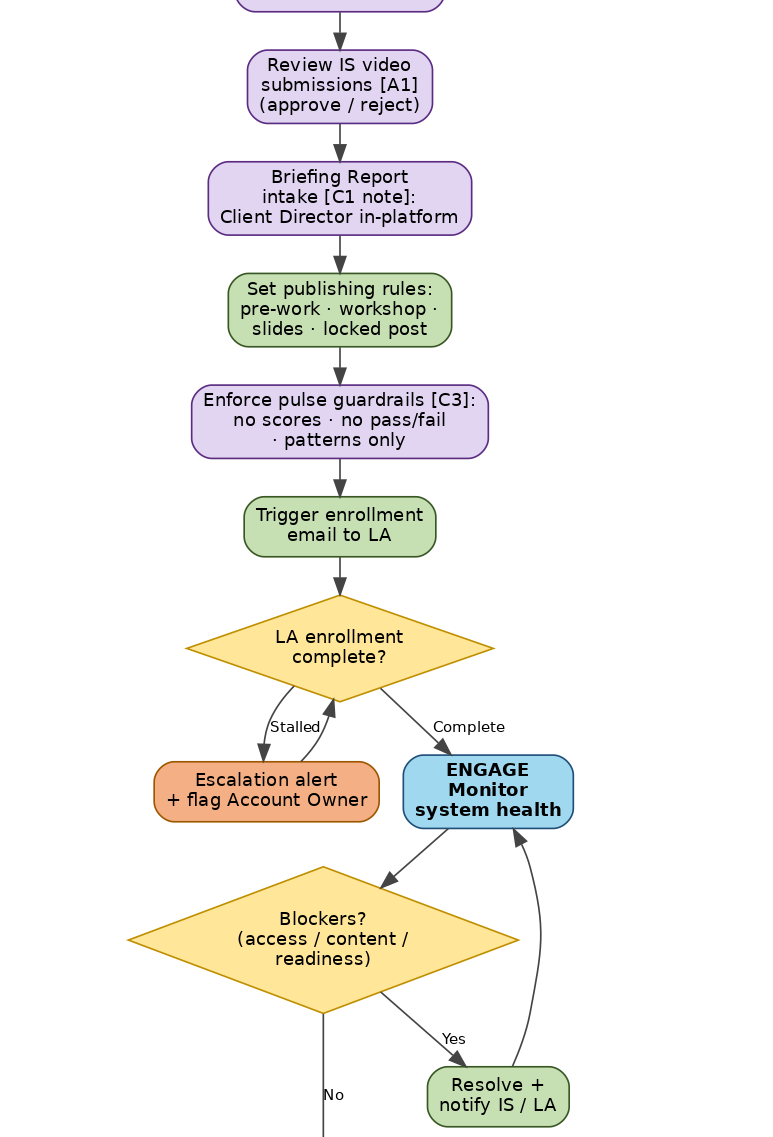
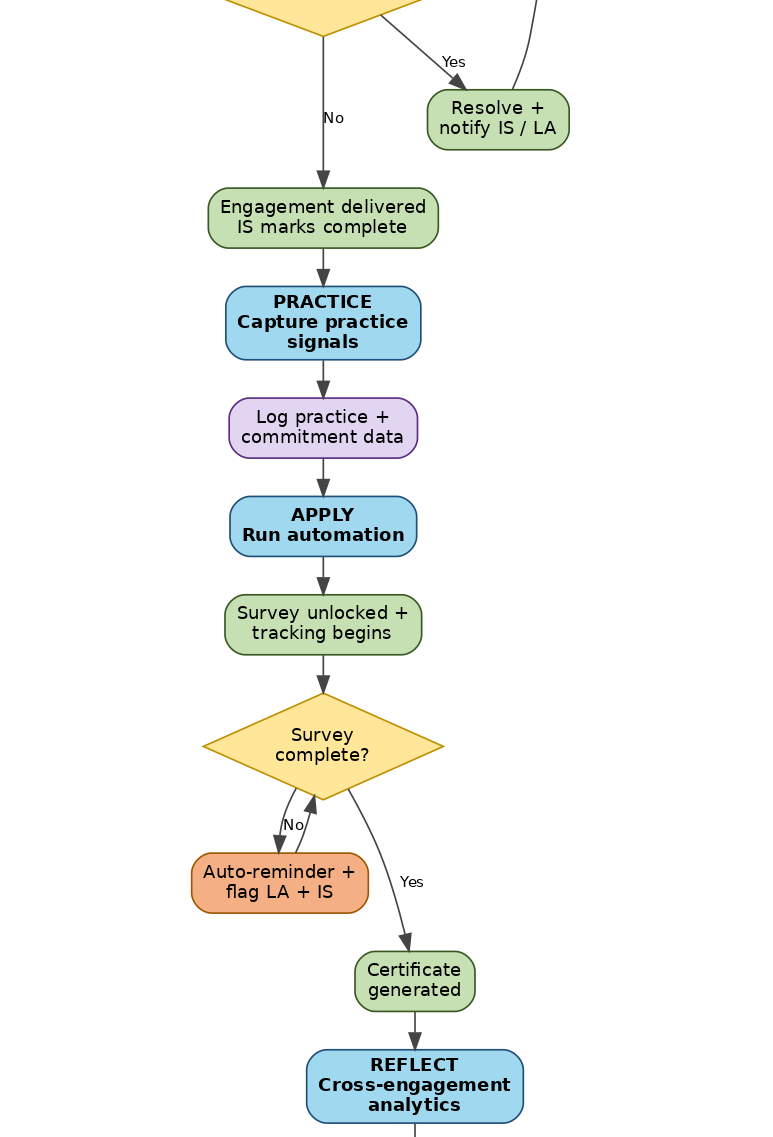
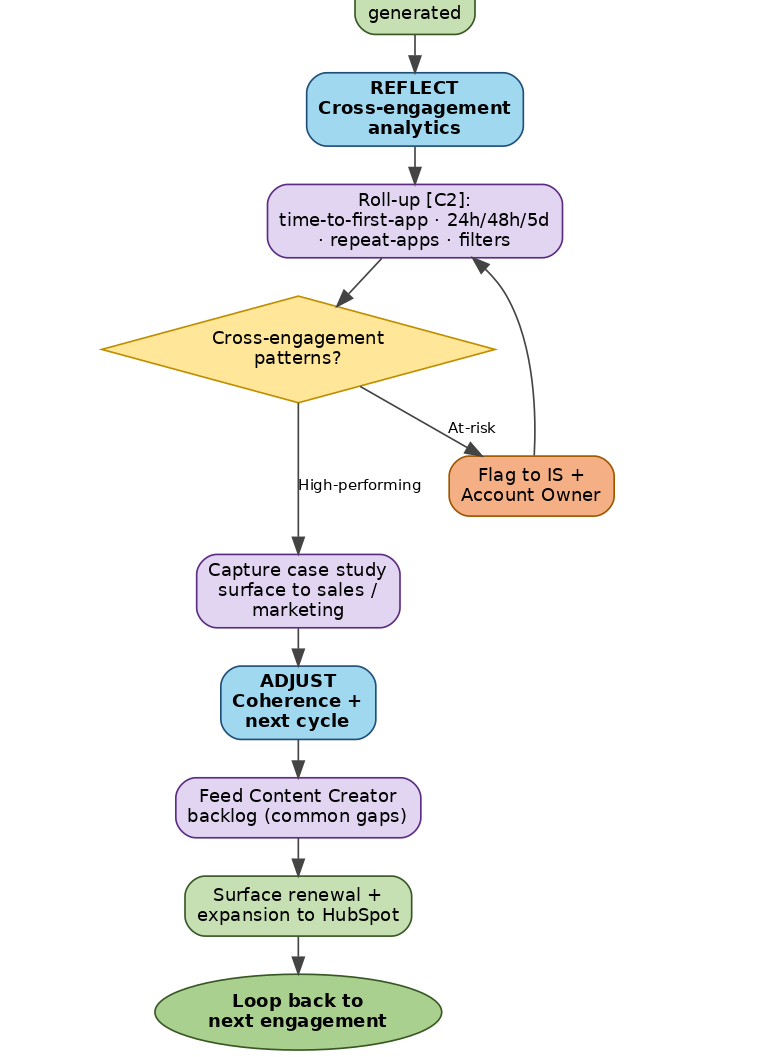
5e. Content Creator (new in v3 — flow to be designed)
v3 introduces Content Creator as the fifth role with the goal: "Designs for application and reinforcement, not consumption." We have not yet drafted a detailed flow for this role because the v3 user stories don't specify the day-to-day workflow. Based on what v3 does say, we recommend the Content Creator flow be designed around four responsibilities:
Pre-engagement assets. Build workshop intro text (focus points + reminders) per v3 B1, including TTS variants.
Pulse-check authoring. Author the 3 MCQs per workshop, mapped to focus points, per v3 C2.
Microlearning library. Create reusable microlearning items that the IS can recommend per v3 G3 — explicitly designed for application and reinforcement, not consumption.
Gap-driven backlog. Receive cohort-gap signals from PM and IS, and prioritize new microlearning based on observed patterns (e.g., common misconceptions, slow time-to-apply on specific strategies).
Recommended next step for the Content Creator role Before drafting a flow, run a brief working session with whoever holds this role today (or whoever will). The two questions to answer are: 1. What signals from Platform Manager and Instructional Strategist would actually change what you build next? 2. What does "designed for application" mean in practice — what makes a microlearning item application-oriented vs. consumption-oriented? The answers will define the Content Creator's dashboard and what triggers their work. |
|---|
6. Cross-cutting recommendations
These recommendations span all five roles. They aren't tied to a specific flow, but they show up in every flow once adopted.
6.1 Add the automated intervention layer
The intervention layer detects absence of expected behavior at each phase and triggers a role-specific response. v3 makes the trigger thresholds explicit: 24 hours, 48 hours, 5 days.
| Phase | Stuck signal | Triggered response |
|---|---|---|
| Prepare | Pre-work incomplete <24 hrs before engagement | Auto-nudge participant; flag on IS + LA dashboards |
| Practice | No action plan submitted within 24 hrs | Auto-nudge participant; IS sees gap on dashboard |
| Apply | No application within 24h / 48h / 5d | Microlearning + reminder cascade; if attempted+failed → targeted support |
| Reflect | Survey not complete | Auto-reminder; certificate gated behind survey; LA + IS notified |
| Adjust | Drift in repeat application (week 2-6) | Spaced nudges; LA reinforcement prompt; IS supplemental release |
| Adjust | At-risk cohort patterns across engagements | PM flags to IS + Account Owner; high-perf cohorts → case study |
6.2 Track time-to-apply, not just completion
Per the v3 measurement section: "% reporting use of a strategy within 24 hours, 48 hours, 5 days? % who apply a strategy more than once. Average & median time from learning to first classroom use. Average & median number of applications needed for effective mastery." These are the metrics that should anchor every dashboard — not generic completion rate.
6.3 Make timed content release a first-class concept
v3 formalizes this through the locked-resources mechanism (D1/D2) and existing publishing rules. Formalize four visibility states for every content asset: (1) draft, (2) pre-engagement-visible, (3) day-of-only, (4) post-engagement-released. All transitions are logged. IS can override on a per-engagement basis; defaults are set by Platform Manager.
6.4 Patterns, not individuals
v3 is explicit: "Results are aggregated for Instructional Strategists (patterns), not individual student-like grading views." Build every IS-facing analytic this way by default. Individual-level data should require an explicit action to surface (e.g., "focus on this participant") and should be logged.
6.5 Next-engagement surface — let the client see it first
When the IS surfaces a next-PD signal, route it to the LA dashboard before the Account Owner. This turns the LA into the internal champion for the renewal conversation. The Platform Manager handoff to HubSpot happens after the LA has expressed interest — not before.
6.6 Briefing Report — let Client Directors create in-platform
v3 explicitly raises this as an open question in the Strategist Visibility section. Our recommendation: yes, Client Directors create the Briefing Report directly in the platform rather than in HubSpot. This gives the Platform Manager a structured intake, lets the IS see the report alongside the LA Context Profile, and makes the Briefing Report a queryable signal for cross-engagement analytics. HubSpot keeps its commercial role; the platform owns delivery.
7. Client perspective — what gets better
| Today (current flows) | After (revised flows, v3) |
|---|---|
| Participants register, attend, complete a survey. Platform doesn't see whether the learning was applied. | Participants practice in-session, commit to an action plan, and have the platform follow up at 24h / 48h / 5d with role-specific nudges. |
| LAs get an engagement list and decision questions, but no structured input to shape the engagement. | LAs complete a School Context Profile (under 5 min) that directly shapes the IS's pre-engagement prep. Their context input is visible 3+ days before the engagement. |
| Participants don't know what's expected of them between engagement and follow-up. | Every phase shows the next expected behavior; locked resources entice return; certificates gate behind survey + action plan. |
| Pre-work readiness only becomes visible the day of the engagement. | Pre-work readiness is gated at 24 hours; LA can act before the engagement. |
| IS prep is generic. | IS Context Brief shows readiness rating, change pressures, top-3 priorities, narrative note, pulse aggregates, and outlier flags — visible 3+ days before. |
| No visibility into impact for school leaders. | Cohort outcomes view: completion, application rate + speed, repeat-application rate, school-impact evidence — exportable. |
| No way for participants to meet the IS before they arrive. | IS intro video (≤30 sec) plays automatically when the participant opens their workshop. |
8. Company perspective — what gets better
| Today (current flows) | After (revised flows, v3) |
|---|---|
| Engagement completion is the last data point. No clear signal for renewal or expansion. | Every cycle ends with an Adjust phase that surfaces next-engagement signals to HubSpot + Account Owner. |
| No visibility into at-risk cohorts mid-engagement. | Platform Manager sees pattern detection across cohorts; flags at-risk + high-performing automatically. |
| No case-study pipeline. | High-performing cohorts get auto-captured for sales / marketing use. |
| Resource visibility is a manual decision per engagement. | Publishing rules set once by Platform Manager; per-engagement overrides logged. |
| IS prep time spent searching for context. | IS Context Brief is structured + queryable; LA School Context Profile is reusable across engagements. |
| No way to know which instructional strategies are easiest/hardest to apply. | Cross-engagement analytics filter by readiness, change load, and priority area — answering 'do schools with X profile apply Y strategy faster?' |
| The behavioral-change value prop is asserted, not evidenced. | Time-to-apply + repeat-application + mastery-curve metrics produce the evidence to defend pricing and renewals. |
| Content Creator builds in isolation. | Common-gap signals from PM + IS feed the Content Creator backlog — microlearning library evolves with the population. |
9. Implementation roadmap & next steps
We recommend phasing the work so that the highest-value behavioral changes ship first, and the platform-internal infrastructure catches up in parallel.
| Phase | What ships | Why first / why later |
|---|---|---|
| Phase 1 — Foundation | • Adopt 6-stage cycle vocabulary across all dashboards • Add Practice (action plan) and Apply (48-hour gate) phases • 24h / 48h / 5d application thresholds + nudge cascade • Mark-complete trigger + survey gate + certificate • Locked-resources mechanism (D1/D2) |
These are the smallest changes with the largest behavioral payoff. They make the platform produce evidence of application rather than just completion. |
| Phase 2 — Context layer | • LA School Context Profile (A1–A5) • Cohort Snapshot per workshop (B1, B2) • IS Context Brief + Strategist Insights (C1, E2–E4) • Pulse-check Likert + 3 MCQs with guardrails (C1–C3) • IS intro video upload + PM approval queue (A1, A2) |
The data Phase 1 produces only gets valuable when it's framed by context. This is also where the LA becomes a structured signal source rather than just an attendance tracker. |
| Phase 3 — Platform Manager + automation | • Platform Manager flow built end-to-end • Publishing-rule engine (4 visibility states) • Automated intervention layer for all phases • Pattern detection + at-risk / high-perf flagging • Briefing Report intake in-platform |
Higher-effort engineering work. Worth doing after Phase 1+2 prove the cycle approach is viable. |
| Phase 4 — Business + Content loop | • Renewal / expansion signal to HubSpot • Case-study capture pipeline • Content Creator backlog feed from cross-engagement gaps • Time-to-apply + mastery-curve metrics surfaced to sales / marketing |
Closes both loops — the renewal loop with the client, and the content loop with the Content Creator. Depends on Phases 1–3 producing the right signals. |
Recommended first conversation with your team Before any building starts, run one workshop to align on the 6-stage cycle vocabulary. • Pin the 6 phases (Prepare, Engage, Practice, Apply, Reflect, Adjust) to a whiteboard. • For each phase, ask each of the 5 roles: "what's the next behavior I expect, and what should happen if it doesn't?" • Use the answers to draft the intervention layer rules. • Capture which phases are well-covered today and which are not. Most of your gaps will cluster in Practice and Apply — exactly where v3's behavioral payoff lives. |
|---|
Appendix A — How to read the flowcharts
All five flowcharts use the same color and shape language:
| Element | Meaning |
|---|---|
| Green ovals | Start / end terminator |
| Light-blue rounded box, bold | Applied Learning Cycle phase header (Prepare / Engage / Practice / Apply / Reflect / Adjust) |
| Light-green rounded box | Standard action or system step |
| Light-purple rounded box | New in v3 — added or substantially changed in this update |
| Yellow diamond | Decision gate — flow branches based on the answer |
| Orange rounded box | Automated nudge / intervention — fires when expected behavior is absent |
| Solid arrow | Mandatory next step |
| Dashed arrow | Cross-role read or loop-back |
Appendix B — Editing the flowcharts
Mermaid source files for all five flowcharts are included alongside this document in the mermaid_sources/ folder. Each file is plain-text and can be pasted into:
Mermaid Live Editor (mermaid.live) — free, web-based
Lucidchart — File → Import → Mermaid
Miro — Mermaid plugin
Notion / GitHub README — paste inside a ```mermaid``` code block
The five v3 files:
| File | What's inside |
|---|---|
| 01_participant_flow.mermaid | Revised Participant flow (Section 5a) — v3 |
| 02_instructional_strategist_flow.mermaid | Revised IS flow (Section 5b) — v3 |
| 03_learning_administrator_flow.mermaid | Revised LA flow (Section 5c) — v3 |
| 04_platform_manager_flow.mermaid | New Platform Manager flow (Section 5d) — v3 |
| 05_integrated_cross_role_view.mermaid | Master integrated cross-role view (Section 4) — v3, includes Content Creator |
Each source file has a header comment block documenting design intent and the specific changes from prior versions. Editing the Mermaid is the easiest way to iterate before committing to a build.
Appendix C — Mapping of v3 user stories to flow steps
Quick reference: which v3 user story shows up where on which role's flow.
| v3 Story | What it specifies | Appears on |
|---|---|---|
| A1 (IS) | Record + manage strategist intro video (≤30 sec) | IS flow (Onboarding); PM flow (Approval queue) |
| A2 (PM) | Auto-associate strategist intro video to workshop | PM flow (Prepare); Participant flow (Prepare) |
| B1 (CIS) | Workshop introduction text (focus points + reminders, TTS) | Participant flow (Prepare) |
| C1 (Part) | Participant comfort self-assessment (Likert 5-point) | Participant flow (Prepare) |
| C2 (Part) | Three pre-engagement MCQ pulse-check questions | Participant flow (Prepare) |
| C3 (PM) | Diagnostic-not-test guardrails | PM flow (Prepare); LA flow (Prepare monitoring) |
| D1 (Part) | Locked resources visible pre-workshop | Participant flow (Prepare) |
| D2 (IS) | Strategist releases resources after workshop | IS flow (Adjust); Participant flow (Adjust) |
| A1–A5 (LA) | School Context Profile | LA flow (Onboarding); IS flow (Prepare Context Brief) |
| B1–B2 (LA) | Workshop Cohort Snapshot | LA flow (Prepare); IS flow (Prepare Context Brief) |
| C1 (IS) | Pre-engagement Context Brief | IS flow (Prepare) |
| C2 (PM) | Context fields stored as structured analytics signals | PM flow (Reflect Analytics) |
| D1 (LA) | Context entry under 5 min | LA flow (Onboarding) |
| D2 (PM) | Sensitive-info guardrails | PM flow (Prepare guardrails) |
| E2 (IS) | Track engagement: logins + intro video views | IS flow (Prepare Insights) |
| E3 (IS) | Pulse-check aggregates | IS flow (Prepare Insights) |
| E4 (IS) | Notable outliers / pattern-based flags | IS flow (Prepare Insights) |
| F1 (Part) | Collect participant profile at enrollment | Participant flow (Onboarding) |
| F2 (IS) | Strategist sees cohort summary | IS flow (Prepare Insights) |
| G1 (IS) | Strategist responds asynchronously to reflections | IS flow (Apply intervention) |
| G2 (IS) | Schedule 1–3 follow-up nudges | IS flow (Apply intervention); Participant flow (nudges) |
| G3 (IS) | Recommend microlearning | IS flow (Apply intervention); Content Creator backlog |